Anyone who plays golf indoors or in variable weather needs a reliable rain-or-shine solution. This guide reviews five top picks that pair with popular simulators, mats, and training aids to help you practice year-round. From realistic mats to motion sensors and swing trainers, each option supports different goals—whether you’re aiming for precise swing analysis, improved tempo, or simply a fun way to play virtual rounds when the weather won’t cooperate.
Buying will hinge on your setup: space, budget, and how serious you are about analytics. The following table provides a quick look at the chosen products to help narrow your choices before diving into detailed sections.
| Product | Brand | Key Benefit |
|---|---|---|
| Orlimar Golf Mat for The OptiShot 2 | Orlimar | Realistic turf feel and easy setup for OptiShot 2 users |
| PHIGOLF Home Golf Simulator | PHIGOLF | Interactive swing analysis with motion sensor and app connectivity |
| Solvora Rubber Golf Tees – 8 Pack | Solvora | Durable, adjustable-height tees for mats and simulators |
| VIVIDLY Rubber Golf Tees – 6 Colors | VIVIDLY | Color-coded sizes for quick setup and consistent launches |
| SmarTopus Golf Tempo & Grip Trainer | SmarTopus | Swing tempo and grip correction for home practice |
Orlimar Golf Mat For The OptiShot 2
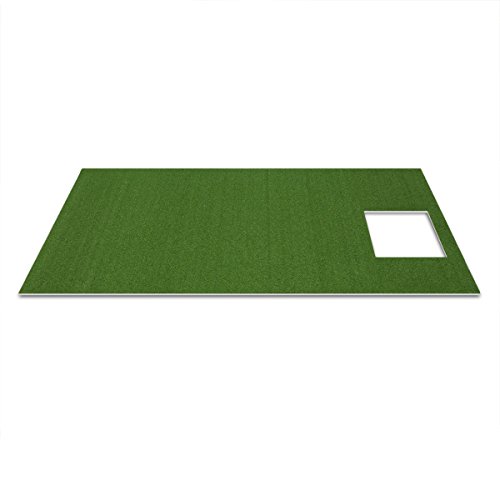
The Orlimar golf mat provides a realistic turf feel that mirrors a well-groomed fairway or tee box. Its pre-cut hole is designed to fit the OptiShot 2 infrared sensor base, aiding straightforward setup for indoor use. Note that the OptiShot 2 hitting platform sits raised above the mat surface, which is normal for many home simulators. This mat supports year-round practice, making it a practical option for indoor golf enthusiasts seeking consistent feedback and durability during rainy runs or late-night sessions.
Ideal for home setups, the Orlimar mat helps prevent wear on hard floors while offering a stable foundation for swings. It pairs well with OptiShot 2 and similar infrared sensor bases, giving you a reliable practice environment when outdoor play isn’t feasible. The mat’s construction aims to stay resilient under frequent use, reducing replacement costs for dedicated players.
PHIGOLF Home Golf Simulator

The PHIGOLF system combines a motion-sensor swing analysis with a swing stick, designed for both indoor and outdoor use. It connects with mobile apps for Android and iOS, and supports E6 Connect for access to additional courses. Setup and Bluetooth pairing are guided by the user manual, with in-app tutorials to address common issues. While it offers engaging gameplay and swing feedback, users should be aware that results may not match the precision of dedicated launch monitors. This makes PHIGOLF a solid option for casual play with learning benefits rather than a professional-grade analytics tool.
PHIGOLF emphasizes accessibility and social play—world-class courses, online matches, and head-to-head modes support social practice with family and friends. It is suitable for players who want a versatile, interactive experience that still functions well in a typical home space, especially where weather disruptions would otherwise limit practice time.
Solvora Rubber Tees For Mats & Simulators – 8 Pack

Solvora’s rubber tees are designed for simulator-ready durability, outperforming wooden or plastic alternatives on rubber mats and in carts. The set features a mixed-size approach, enabling players to adjust height for better launch conditions and easier analysis. The rounded base helps prevent wobble by matching standard mat holes, which supports stability even with upgraded golf balls. This makes the 8-pack ideal for repeated practice sessions where consistent tee height matters in digital feedback and ball flight simulations.
In practice, golfers can mix sizes to replicate various on-course scenarios. The durable rubber material minimizes wear from frequent use, and the anti-flight interference design aids accurate data capture during swing analysis. For indoors, it’s a dependable, low-maintenance option that helps maintain consistent ball contact during simulated practice.
VIVIDLY Rubber Tees For Mats And Simulators

The VIVIDLY set features six colors and six sizes, offering a color-coded system to quickly identify the right tee height during practice. Built from durable rubber, these tees are designed for both indoor mats and outdoor ranges, ensuring long-term use in varying environments. The design promotes stable ball placement with anti-flight interference features, helping players align shots consistently. The color-and-size variety supports rapid drill changes, which is useful when working on swing tempo and launch conditions in a simulator or on a practice mat.
Practically, the multi-size approach lets players experiment with different launch conditions without swapping tees. The robust construction suits heavy practice days, and the color cues simplify routines for coaches or family members guiding practice sessions. It’s a versatile option for players who want quick, repeatable setups in both home and office gym spaces.
SmarTopus Golf Tempo & Grip Trainer

The SmarTopus trainer focuses on grip, tempo, and swing plane, with a weighted swing head and a hand-shaped grip to reinforce proper hand positioning. It’s designed for right-handed golfers and supports both indoor and outdoor practice. The trainer includes two weight adjustments to accommodate irons and woods, making it flexible for different swing speeds and training goals. While it can improve grip consistency and tempo, users should consider it as a complementary tool to a broader simulator system, rather than a standalone analytics solution.
Designed for home use, SmarTopus supports a range of practice scenarios, including tempo drills and swing corrections. Its straightforward operation makes it accessible for beginners while still offering value to more seasoned players seeking incremental improvements in rhythm and swing plane. The device works well in combo with viewing swing feedback on a simulator screen or coaching app.
Buying Guide: Key Purchase Considerations
- Space and layout: Measure your room to determine mat length, net height, and the required clearance for a swing. Shorter mats fit tighter spaces but may reduce realism; taller nets suit larger rooms for full swings.
- Simulator compatibility: Ensure your chosen gear aligns with your preferred system (OptiShot, E6 Connect, mobile apps). Some devices pair better with specific mats or tees to optimize data capture.
- Durability and materials: Rubber tees and heavy-duty nets withstand frequent use and weather variations indoors. Look for stable bases and reinforced edges to minimize wear and wobble during practice.
- Analytics vs. casual play: If you want precise data, prioritize a system with robust analytics (sensor-based or camera-based). Casual players may prefer interactive games and social features for motivation.
- Setup complexity: Some products require manual setup, Bluetooth pairing, or app installation. Consider the learning curve and whether guidance is provided during setup.
- Maintenance: Mats, tees, and nets require routine cleaning. Rubber tees tend to last longer and resist warping, while nets may need occasional tightening to maintain tension.
- Pricing and scalability: Start with a core package (mats and tees) and add sensors or swing trainers later if needed. This approach helps manage budget while expanding capabilities over time.
- User experience factors: Look for lag-free sensor data, clear visual output in the app, and modes that support both single-player practice and social play with friends and family.
In summary, a rain-or-shine golf setup typically combines a sturdy practice mat, durable tees, and a versatile training tool. The right mix allows persistent practice, weather resilience, and meaningful feedback. Consider your space, desired analytics, and how you prefer to learn when selecting a combination from these five options.